



Football Manager 26 provides impressive graphics, but performance changes with hardware. Proper settings keep gameplay fluid. Low, medium, and high-end PCs each need specific adjustments. This guide provides exact settings for each type of PC.
Hardware like GPU, RAM, and storage affects graphics performance. Minimum 8 GB RAM works, but 12 to 16 GB improves stability. Installing the game on an SSD reduces loading times. Follow this guide to get the best visuals and smooth gameplay.
Low End PC Graphics Settings for Football Manager 26
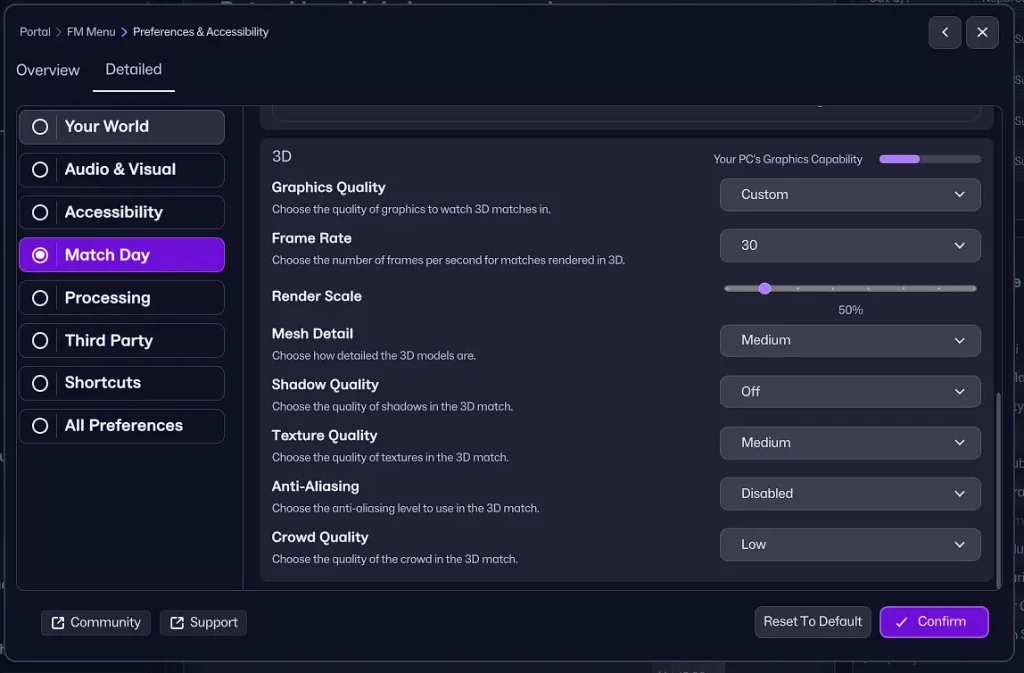
Low-end PCs run best with minimal strain. Keep the frame rate at 30 for stability. Render quality at 50 balances visuals and performance. Medium mesh keeps models detailed. Shadows off eases GPU load for better FPS.
- Nepal Super League database for FM26 is live
Choose medium textures to keep visuals clear and the game smooth. Turn off anti-aliasing to lighten the load. Set crowd quality low for smoother gameplay. Keep an eye on FPS and tweak as required.
Low-end PCs can still provide smooth and enjoyable gameplay. Installing the game on an SSD reduces load times. Testing settings in different matches helps find the perfect balance. Proper adjustments keep matches smooth and visually acceptable.
Medium PC Graphics Settings for Football Manager 26
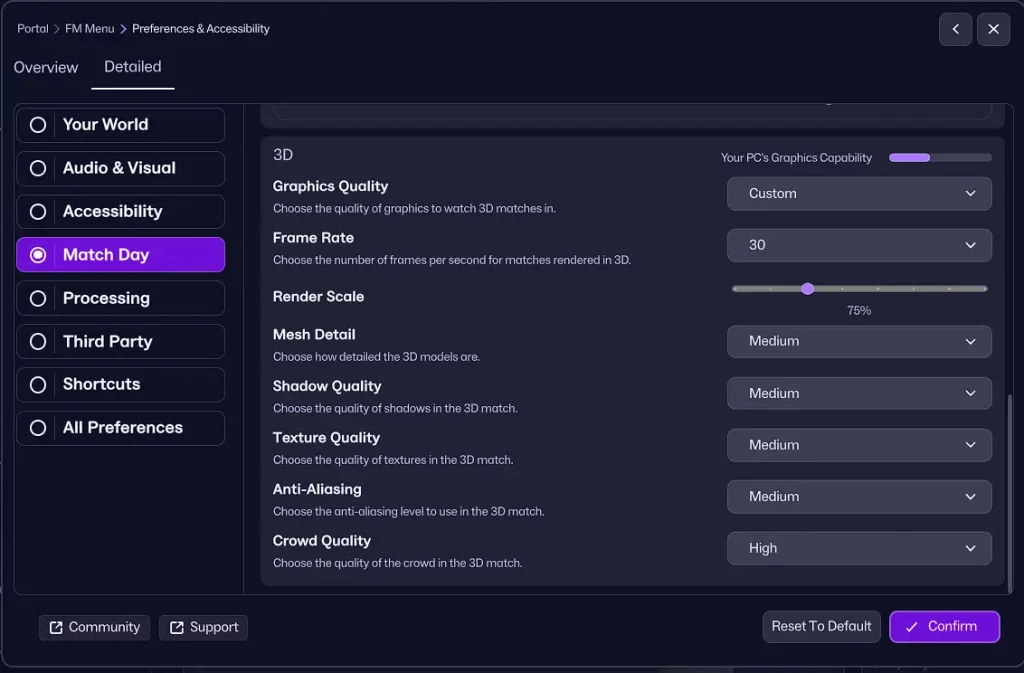
Medium PCs allow higher visual quality without compromising performance. Set render quality to 75 for clear and sharp visuals. Mesh and shadows at medium give realistic models and lighting. Textures on medium provide consistent clarity.
- Check out official system requirements for Football Manager 26
Anti-aliasing on medium produces smooth edges. High crowd quality makes stadiums immersive. 12 GB RAM maintains FPS stability. Using an SSD improves responsiveness and reduces load times.
Gradually adjust render or shadow settings if performance drops. With medium PCs, visuals remain immersive and gameplay stays smooth. Adjust settings while playing to refine performance. Balancing graphics and FPS gives the best results.
High End PC Graphics Settings for Football Manager 26
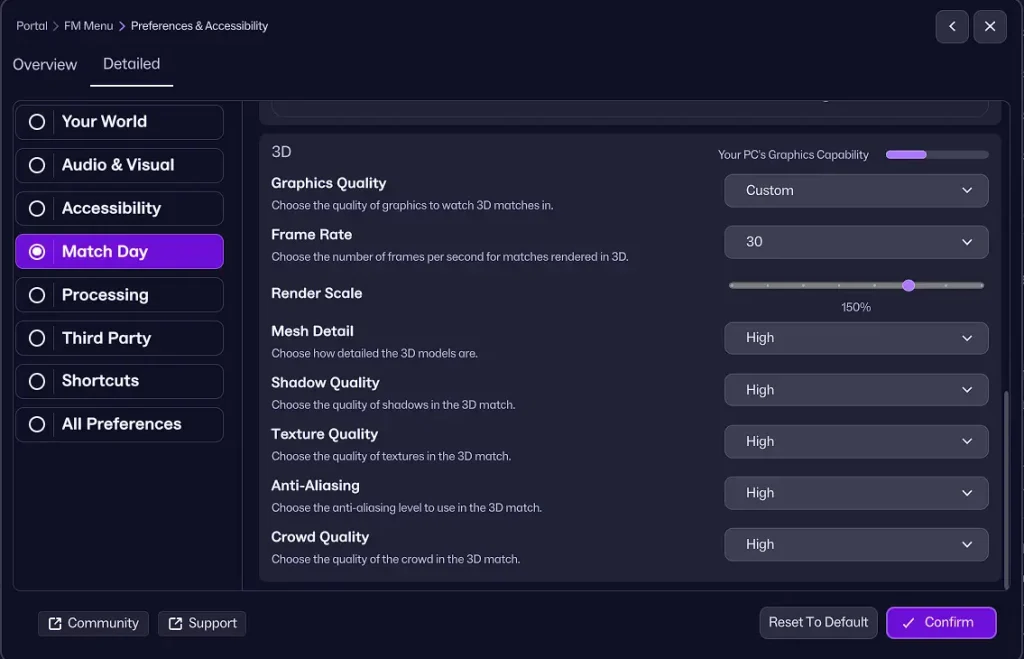
High-end PCs can run Football Manager 26 at maximum quality for ultra-realistic visuals. Increase render to 150 percent for crisp clarity. Mesh, shadows, and textures on high enhance realism and detail. Anti-aliasing on high produces smooth edges.
Crowd quality high brings stadiums to life. High-end systems with 12 to 16 GB RAM and a strong GPU handle these settings effortlessly. SSD storage reduces load times even with maximum graphics. Monitoring FPS ensures stable gameplay at all times.
Fine-tuning graphics settings improves immersion. Matches appear sharper and more realistic. High-end PCs can display Football Manager 26 visuals flawlessly. Adjust settings to match your hardware for maximum performance.
Why RAM and SSD Improve Football Manager 26 Performance
RAM has a major impact on game stability and responsiveness. Low RAM may cause stuttering or slow rendering. High RAM keeps FPS steady even on high settings. SSDs reduce loading times and make transitions seamless. Traditional hard drives may slow textures and match loading. Combined with a capable GPU, RAM and SSD deliver optimal performance.
FAQ About Football Manager 26 Graphics Settings
Which settings work best for low-end PCs?
Frame 30 render 50 medium mesh shadows off medium textures anti-aliasing off low crowd
Can medium PCs handle high textures?
Medium PCs run medium textures smoothly. High textures can lower FPS.
Do SSDs improve performance?
SSDs speed up loading and make gameplay more responsive.
How much RAM is needed for high settings?
12 to 16 GB RAM ensures stable performance at maximum graphics.
Does your GPU play a role in graphics quality?
Yes high-end GPUs are necessary for maximum settings and smooth FPS.
Conclusion on Football Manager 26 Graphics Settings
Optimizing graphics for Football Manager 26 improves performance on all PCs. Low, medium, and high-end systems require different adjustments. Configure render mesh shadows textures anti-aliasing and crowd quality. RAM and SSD usage enhances overall performance significantly.
Your hardware determines the best graphics setup. Low PCs run stable, medium PCs combine visuals with smooth gameplay, and high PCs maximize detail. Keep an eye on FPS, make tweaks, and enjoy immersive matches. Football Manager 26 looks its best when configured to your system.


